

Control the size of shared content in a meeting
 Teams
TeamsMicrosoft
What's new in Microsoft Teams
Desktop App.
April 2026
Control the size of shared content in a meeting
During Teams meetings, drag the divider between shared content and the video gallery to adjust how much space each takes up.

Less is more
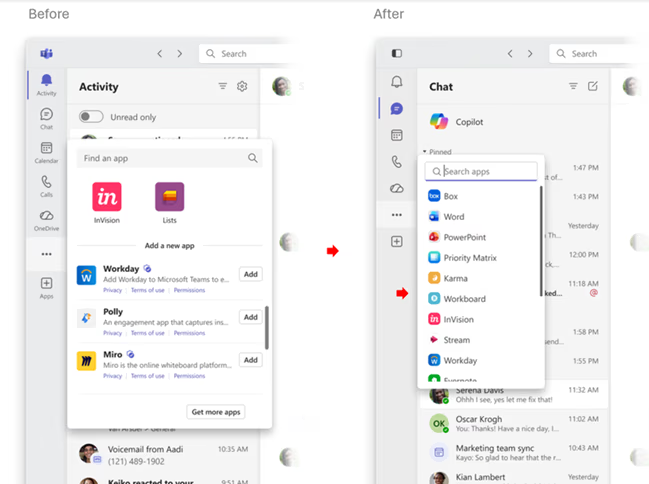
In the new simplified app bar in Teams, labels are now hidden by default, so you can focus on what matters. To learn more, see Change settings in Microsoft Teams.
Take notes during instant meetings
Meeting notes are now available for instant meetings that started via Meet now in the calendar. To learn more, see Take meeting notes in Microsoft Teams.
Quick views in Teams chat
Filter your Teams chats by@mentions, followed threads, and more by selecting Quick views at the top of your chat list. To customize, hover over a category and select More quick view options Generic Ellipsis button. To learn more, see Manage notifications in Microsoft Teams.
Accurate transcripts for meetings with sign language interpreters
Transcripts now attribute contributions to the original participant using sign language, not the interpreter.
Automatic spoken language detection
Teams will automatically detect each speaker's spoken language and update it in real time as the conversation evolves. Manual spoken language selection will no longer be available. To learn more, see Multilingual speech recognition in Microsoft Teams.
Delegate calls with M365 Copilot
Microsoft 365 Copilot can help you answer incoming Teams calls and schedule follow-up appointments, ensuring you stay focused without missing important connections. To learn more, see Use Copilot Call Delegation in Microsoft Teams.

